Welcome to the very first SP Page Builder update of the year!
We are kicking things off for your favourite SP Page Builder with a release that brings important fixes, a few handy new enhancements, and thoughtful refinements to help you build pages more smoothly and with greater ease.
So, let’s take a closer look at what’s new and what’s improved in the latest version.
SP Page Builder v6.2.3 Changelog:
- New: Added device-based visibility control for Popups.
- New: Introduced field-based sorting in Dynamic Collection addon.
- Update: Enhanced media fields and Media Manager with image details on hover (size and resolution).
- Update: In Slideshow addon, you can now add dynamic slide backgrounds in the Text Thumbnail bullet option.
- Update: Introduced “Current Date” option in Dynamic Collection addon’s filter conditions.
- Update: Added date range filtering support in Dynamic Collection addon’s filter conditions.
- Update: Added a date formatting option to the Form Builder.
- Fix: Resolved an issue where Dynamic Content item ACL was not applying correctly.
- Fix: Corrected popup ACL functionality to ensure popups appear only for the intended users.
- Fix: Fixed breadcrumb display issues on all Detail pages.
- Fix: Resolved an issue where the Heading addon failed to parse 0 correctly.
- Fix: Fixed image display issues inside popups on multilingual sites.
Visibility Controls for Popups Across Various Devices

Imagine visiting a website on your phone and a huge popup suddenly blocks the screen. Frustrating, right?
In SP Page Builder, we wanted to prevent such issues by bringing responsive controls for popups. Now, you can decide which popups appear on desktop, tablet, or mobile, so users only see what works best for their device.
This way, your popups stay helpful and engaging, never annoying, no matter how people visit your site.
Introduced Field-based Sorting for Dynamic Content
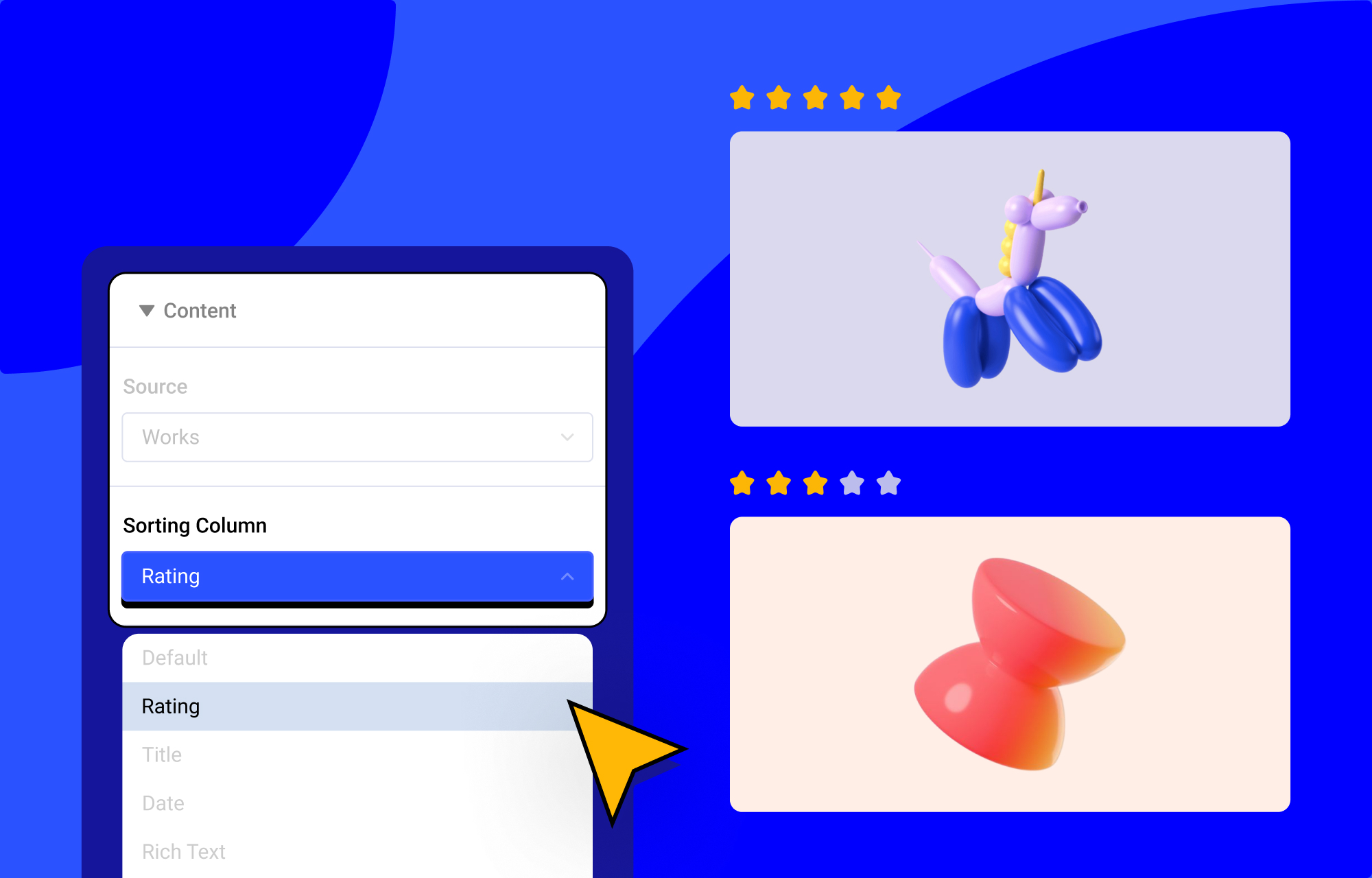
Field-based sorting in SP Page Builder gives you complete control over how dynamic content lists appear on your pages. Instead of depending on default or random ordering, you can organize content using the value of a specific field that truly matters to your layout.
In simple terms, it allows you to sort dynamic content based on your defined field.
The Sorting Column option in a collection lets you:
- Organize dynamic content using a specific field from the collection
- Control the display order to make your layout more meaningful
- Choose Ascending or Descending order for precise arrangement
For example, a collection like Services with a Rating field, you can:
- Sort services by rating to highlight top performers
- Display higher rated items first using Descending order
- Show lower rated items first using Ascending order
Dynamic Content Filters with Current Date & Date Range Support
Keeping time based content up to date just got a whole lot easier!
With the new Current Date option in Collection addon’s filters, SP Page Builder can now automatically show or hide content based on current date. No manual updates. No constant checking.
How it Works?
When you select a Date field and choose “Is After” or “Is Before” as the condition, you’ll now see a Date Type option.
Selecting Current Date means SP Page Builder will compare your content’s date with the current day, not a fixed date you set in advance.
In simple words, your content reacts to time as it passes, appearing or disappearing on your rule. This happens automatically for every visitor, every day.
Why you’ll love this:
The Current Date option is perfect for:
- Showing only upcoming events while past ones fade away.
- Automatically expiring offers or promotions.
- Displaying announcements only when they are relevant.
Once you set it up, SP Page Builder takes care of the rest. Your content stays fresh, accurate, and perfectly timed without any extra effort from you!
Plus, you can also use the “In Between Dates” option to publish content only within a specific date range.
Other Notable Updates & Fixes
In the Slideshow addon, when you select Text Thumbnails as the bullet style, a new Use Slider Image option appears. Enable it to display images alongside the text in your slider bullets for a richer visual experience.
The Form Builder addon now includes date formatting support to let you have full control over how dates are displayed in your forms. When you select Date as the field type in the form items, a Date Formatter option appears, where you can choose the exact date format you want to show.
Fixes:
An issue affecting dynamic content permissions (ACL) has been fixed, ensuring that content visibility now correctly follows assigned user roles and access levels.
Popup permissions are now working as expected, so popups will only appear for the users they are meant to reach.
A breadcrumb display issue on detail pages has also been resolved, improving navigation clarity and making it easier for visitors to understand where they are on the site.
Update Now!
While we highlighted the key changes in this update, you can go through the changelog to see all the improvement included in this update.